

Description
Download uInvest – Investment Analysis, Portfolio Tracking, Financial Planning
Overview
uInvest is a desktop application designed to help users analyze the performance of various investment types over time. It enables individuals to assess both apparent and actual returns by converting investment values into current-year equivalents, offering a clearer picture of long-term performance. The software supports a wide range of investment categories, including equities, real estate, cash holdings, retirement funds, recurring investments, and capital growth or income-focused portfolios. By projecting future values and comparing them to actual outcomes, users can identify deviations from expected performance, which may signal optimal buy or sell opportunities.
The tool is intended for individuals managing personal investment portfolios who seek data-driven insights to improve decision-making. It is particularly useful for those practicing a strategy of buying low and selling high based on performance spikes and dips. The application allows users to run what-if scenarios, test the impact of different assumptions, and compare multiple investments side by side. This functionality supports informed decisions around holding, adding to, or exiting positions. While the software does not provide investment advice, it offers a structured framework for monitoring and evaluating investment behavior.
uInvest operates on Windows and Mac platforms, with a compact installation size of 12.5 MB. It is available at no cost, making it accessible to a broad audience. The developer did not provide additional information about the company or development background. Real-world use cases include monthly or annual portfolio reviews, retirement planning, tax impact assessments, and benchmarking investment performance against long-term goals.
Key Features & Capabilities
- Performance Analysis by Year – Tracks investment returns annually, converting values into equivalent current-year terms for accurate performance comparison across time periods.
- Future Value Forecasting – Projects the future value of investments based on user-defined assumptions, enabling proactive planning and goal setting.
- What-If Scenario Testing – Allows users to simulate different investment outcomes by adjusting input variables such as growth rates, fees, or tax implications.
- Investment Comparison Tool – Facilitates side-by-side evaluation of multiple investments, helping users determine which options deliver better returns under specific conditions.
- Tax Impact Assessment – Helps analyze how taxation affects net investment returns, supporting more realistic financial planning.
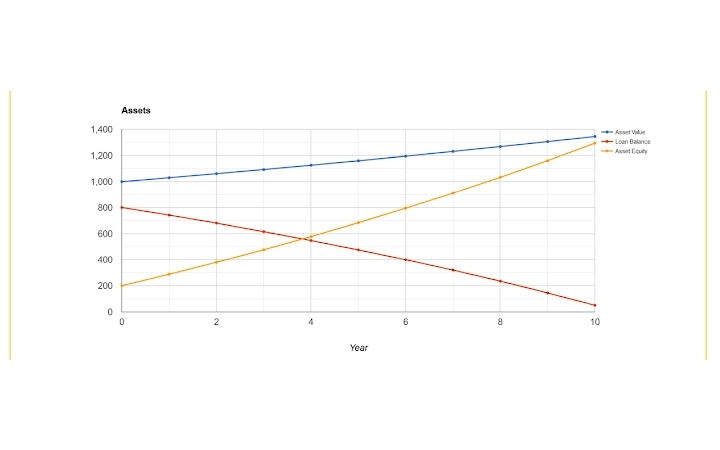
- Visual Performance Tracking – Plots investment parameters over time, allowing users to visualize trends, spikes, and dips in performance.
- Buy/Sell Signal Indicators – Identifies when actual performance deviates significantly from projections, suggesting potential entry or exit points.
- Comprehensive Investment Support – Handles equity, property, cash, retirement funds, recurring contributions, and hybrid capital growth/income investments.
These features are designed to support strategic decision-making in personal finance. For example, a user investing in shares can project a 5% annual capital growth and monitor actual performance after one year. If the real value exceeds the forecast, it may indicate a sell opportunity. Conversely, a significant shortfall could suggest a buying chance. The tool also supports ongoing portfolio reviews, enabling users to align investment behavior with long-term objectives.
User Interface, Workflow & Performance
The user interface of uInvest is structured to support efficient navigation through investment analysis tasks. While specific UI details were not provided, the software is designed for a desktop environment, suggesting a traditional windowed layout with data entry fields, visual charts, and reporting panels. Users can input investment parameters such as initial value, expected growth rate, and tax rate, then generate performance projections.
Workflow efficiency is enhanced through built-in templates for common investment types and the ability to save multiple analysis scenarios. The application allows users to track performance over time and compare actual results against forecasts. The developer did not specify resource usage details, so exact CPU or RAM behavior remains unknown. However, with a file size of 12.5 MB, the software is likely lightweight and optimized for smooth operation on standard systems.
Stability and responsiveness are expected to be consistent with typical desktop applications of similar scope. The absence of real-time data feeds or cloud synchronization suggests the software functions primarily offline. Performance observations are based on general software behavior patterns. Users can expect minimal lag during data entry and chart rendering, especially for single or small portfolios.
Compatibility & System Requirements
uInvest is compatible with both Windows and Mac operating systems, making it accessible to a wide range of users regardless of platform preference. The software has a compact installation size of 12.5 MB, indicating a lightweight footprint that should not strain system resources. However, exact system requirements such as minimum RAM, processor speed, or disk space were not listed by the developer.
Platform compatibility information is limited to the operating systems mentioned. No specific version numbers for Windows or macOS were provided. The developer did not specify whether the application supports older or newer OS versions. Installation is expected to be straightforward, given the small file size and desktop nature of the application. Users should ensure their system meets general desktop software requirements for running a modern application.
For optimal use, it is recommended to run the software on a system with at least 2 GB of RAM and a 64-bit processor, though these are assumptions based on typical desktop software standards. The developer did not provide official hardware specifications. Compatibility with virtual machines or remote desktop environments was not confirmed.
Pros and Cons
Pros
- Free to download and use, making it accessible for budget-conscious users.
- Supports multiple investment types including stocks, real estate, retirement funds, and recurring investments.
- Offers forecasting and what-if analysis for proactive financial planning.
- Visual tools help identify buy/sell signals based on performance deviations.
- Compact size (12.5 MB) ensures fast installation and minimal storage use.
- Designed for regular portfolio reviews to support long-term financial goals.
Cons
- Developer background and company details were not provided.
- No information on system requirements beyond OS compatibility.
- Performance and resource usage details were not specified.
- Limited to desktop use; no cloud sync or mobile access available.
- Results are dependent on user-provided inputs; not a substitute for professional financial advice.
FAQ Section
Is uInvest available for Windows and Mac?
Yes, uInvest is compatible with both Windows and Mac operating systems.
Is uInvest free to use?
Yes, uInvest is available at no cost. There are no subscription fees or in-app purchases.
Can I use uInvest offline?
Yes, the software functions as a standalone desktop application and does not require an internet connection to operate.
Does uInvest provide investment advice?
No, uInvest is a tool for analysis and forecasting. It does not offer financial or investment advice and should not be used as the sole basis for investment decisions.
How often should I review my investments using uInvest?
Regular reviews—such as monthly or annually—are recommended to compare actual performance against projections and identify potential buy or sell opportunities.
Final Thoughts + CTA
uInvest delivers a focused, no-cost solution for individuals seeking to analyze and monitor investment performance with greater precision. Its ability to project future values, test scenarios, and generate visual signals based on performance deviations makes it a valuable tool for proactive financial management. The support for multiple investment types and the emphasis on strategic buy/sell timing enhance its utility for long-term planning.
While the lack of detailed system requirements and developer information may raise questions for some users, the software’s lightweight design and desktop-only functionality suggest reliability and ease of use. For those committed to self-directed investing and regular portfolio reviews, uInvest provides a practical framework to improve decision-making.
Download uInvest now to take control of your investment strategy and enhance your financial outcomes with data-driven insights.
Guides & Tutorials for UInvest App for Chrome
How to install UInvest App for Chrome
- Click the Preview / Download button above.
- Once redirected, accept the terms and click Install.
- Wait for the UInvest App for Chrome download to finish on your device.
How to use UInvest App for Chrome
This software is primarily used for its core features described above. Open the app after installation to explore its capabilities.
User Reviews for UInvest App for Chrome 0
No reviews found





